Master Task Prioritization with the Eisenhower Matrix
The free visual task manager that helps you focus on what truly matters. Organize tasks by urgency and importance in a simple 2×2 priority matrix. No signup required - start prioritizing in 30 seconds.
Join 2,500+ professionals using the priority matrix method. Unlimited tasks, multiple boards, smart reminders, and 7 languages included free.
Also available on mobile:


How the Eisenhower Matrix Works
The priority matrix method used by President Eisenhower. Categorize tasks by urgency and importance, then apply the 4 action rules.
List Your Tasks
Brain dump everything on your mind into Quartask. No filtering, just get it all out.
Sort by Quadrant
Drag each task to the appropriate quadrant: Urgent & Important, Not Urgent but Important, Urgent but Not Important, or Not Urgent & Not Important.
Take Action
Apply the rules: Do Q1 tasks immediately, Schedule Q2 work, Delegate Q3 items, Eliminate Q4 time-wasters.
Review Weekly
Spend 15 minutes each Friday reviewing your matrix. Prevent Q1 emergencies by investing in Q2 work.
Want to master the method? Read our complete guide or download our free printable template.
Why Choose Quartask for Task Prioritization?
The only task manager purpose-built for the Eisenhower Matrix method. No complex setup, no feature restrictions.
Zero-Friction Setup
Start organizing in 30 seconds. No signup, no email verification, no credit card. Just productivity.
Visual Priority Matrix
See all your tasks in a 2×2 Eisenhower Matrix. Instantly identify what needs your attention versus what can wait.
7 Languages
Work in English, Spanish, French, Japanese, Korean, Chinese, or Malay. Productivity without language barriers.
Smart Organization
Drag & drop tasks between quadrants, set smart reminders, track achievements, and never lose sight of priorities.
Popular Use Cases for the Priority Matrix
Discover how professionals use the Eisenhower Matrix to prioritize work and achieve goals.
📊 Project Management
Track deliverables by urgency and strategic importance. Never let important work slip while fighting fires.
🎯 Goal Tracking
Separate busy work from goal-aligned activities. Invest your time in what moves the needle.
📚 Study Planning
Prioritize assignments and manage deadlines. Balance urgent homework with important learning.
🏢 Team Coordination
Share priorities visually with your team. Align on what's truly important versus what's just loud.
📅 Weekly Planning
Use the 15-minute weekly review ritual to stay organized and prevent emergencies before they happen.
✅ Personal Productivity
Master the art of task prioritization in your personal life. Focus on what matters most.
Who Uses the Eisenhower Matrix Method?
From busy executives to students, anyone who wants to prioritize effectively and focus on what matters uses this proven task management framework.
Busy Professionals
Perfect for managing multiple projects and deadlines efficiently. Prioritize tasks and focus on strategic work over busy work.
Students
Ideal for balancing coursework, assignments, and activities. Use the priority matrix to manage study time and never miss deadlines.
Team Leaders
Essential for organizing team tasks and ensuring everyone focuses on high-priority objectives using the Eisenhower method.
Entrepreneurs
Perfect for juggling multiple responsibilities while focusing on growth and strategic initiatives using task prioritization.
What Users Say
Sarah Kim
Product Manager at TechCorp
"I went from 60% reactive firefighting to 40% strategic work in 3 weeks using Quartask's Eisenhower Matrix. The visual quadrants make it impossible to ignore Q2 tasks anymore. Game changer!"
Michael Rodriguez
Graduate Student
"As a PhD student, juggling research, teaching, and coursework was overwhelming. The priority matrix helped me identify what was truly important versus just urgent. My stress levels dropped significantly."
James Wilson
Startup Founder
"We use Quartask for our entire team. The shared understanding of 'urgent vs important' has transformed how we prioritize features. We're shipping more strategic work and fewer reactive fixes."
Lisa Chen
Marketing Director
"The weekly review ritual using Quartask keeps me sane. 15 minutes every Friday prevents Monday chaos. I've eliminated so many Q4 time-wasters I didn't even realize I had."
Why Choose Quartask Over Other Tools?
Unlike generic task managers, Quartask is purpose-built for the Eisenhower Matrix prioritization method.
| Feature | Quartask | Trello | Todoist |
|---|---|---|---|
| Eisenhower Matrix View | ✓ Native | ✗ | ✗ |
| Anonymous Access | ✓ | ✗ | ✗ |
| Free Plan Limitations | None | Limited | Limited |
| 7 Language Support | ✓ | Partial | Partial |
| Drag & Drop Quadrants | ✓ | Lists only | ✗ |
| Achievement Calendar | ✓ | ✗ | ✗ |
Powerful Features for Task Prioritization
Everything you need to master the Eisenhower Matrix method and take control of your priorities.
Zero-Friction Setup
Start using Quartask immediately without signing up! Anonymous users get full access to all features with automatic default board and settings creation.
Unlimited Task Prioritization
All users can manage unlimited tasks per quadrant. Perfect for scaling your productivity without restrictions - no limits, no barriers.
Drag & Drop Priority Matrix
Effortlessly move tasks between quadrants with intuitive drag and drop functionality. Reprioritize your work by simply dragging tasks to where they belong.
Quick Task Capture
Paste content anywhere on the matrix page (Cmd+V/Ctrl+V) to instantly create a new urgent & important task. Lightning-fast task capture for busy professionals.
Quick Status Updates
Update task status instantly with one click. Seamlessly transition tasks from Not Started to In Progress to Completed with visual status indicators.
Task Recovery System
Move completed tasks back to their original quadrants when needed. Perfect for recurring tasks or when work needs to be revisited - full task lifecycle management.
Smart Clipboard
Quickly copy task content to clipboard with one click. Smart copying automatically strips formatting for clean paste operations wherever you need it.
Sticky Notes System
Create, edit, and organize personal notes with 8 color-coding options, rich text support, inline editing, and fuzzy search functionality for quick note management.
Color-Coded Organization
Assign colors to sticky notes and filter by color using interactive badges. Visual organization with beautiful gradient quadrant headers for enhanced visual hierarchy.
Advanced Search
Fuzzy search functionality across notes and tasks. Find what you need instantly by searching through titles and content with real-time results and highlighting.
Markdown Formatting
Format task descriptions and notes with markdown for better readability. Add headers, lists, bold, italics, code blocks, and more - now free for all users.
Custom Quadrant Names
Personalize your matrix with custom names for each quadrant. Rename 'Urgent & Important' to whatever fits your workflow - with reset functionality and 50-character limits.
Smart Reminders
Schedule reminders with preset time buttons (1 PM, 4 PM, 8 PM) or custom times. Enhanced notification system with automatic cleanup of orphaned reminders.
Daily Motivational Quotes
Get inspired with daily motivational quotes featuring elegant gradient design, 20-second auto-dismiss timer, and disable option. Smart daily tracking prevents quote fatigue.
Intelligent Authentication
Seamless Google-only authentication with anonymous user support. Link anonymous accounts to Google for permanent data storage while preserving all progress.
Comprehensive Multilingual Support
Work in your preferred language with complete translations for English, Chinese, French, Korean, Japanese, Spanish, and Malay. Visual flag indicators and persistent language preferences.
Dark Mode & Themes
Automatic dark mode support with system preference detection. Switch seamlessly between light and dark themes with beautiful gradient enhancements and visual consistency.
Responsive Design
Mobile-friendly interface with optimized layouts for all devices. Touch-friendly interactions, responsive grids, and mobile-optimized dialog interfaces.
Multiple Project Boards
Create unlimited project boards to organize different areas of your life or work. Switch between boards, view all tasks at once, or focus on specific projects.
Template Gallery
Start instantly with 5 pre-built Eisenhower Matrix templates for project management, study planning, goal setting, habits, and content calendars.
Board URL Slugs
Each board has a clean, shareable URL slug based on its name (e.g., /matrix/work-projects). Switch boards seamlessly with browser back/forward navigation support and bookmark-friendly URLs for easy access.
Board Migration
Move tasks between different boards to reorganize your workflow. Perfect for evolving projects, changing priorities, and maintaining organized task distribution.
Board Customization
Customize board names, set default boards, and manage board hierarchies. Color-coded board indicators and 'Show Everything' gradient view for comprehensive task overview.
Lightning Fast Performance
Optimized loading with caching, debounced updates, and 60% improved loading times. Optimistic updates provide instant UI feedback with automatic error rollback.
Enhanced Visual Design
Beautiful gradient enhancements throughout the interface. Color borders, hover effects, and visual indicators create an engaging and professional experience.
Smart Data Management
Automatic data integrity with orphaned reminder cleanup, persistent view options in localStorage, and seamless anonymous to registered user data migration.
Achievement Calendar
Track your productivity wins with a visual calendar. See your progress over time, identify patterns, and celebrate your accomplishments.
See the Priority Matrix In Action
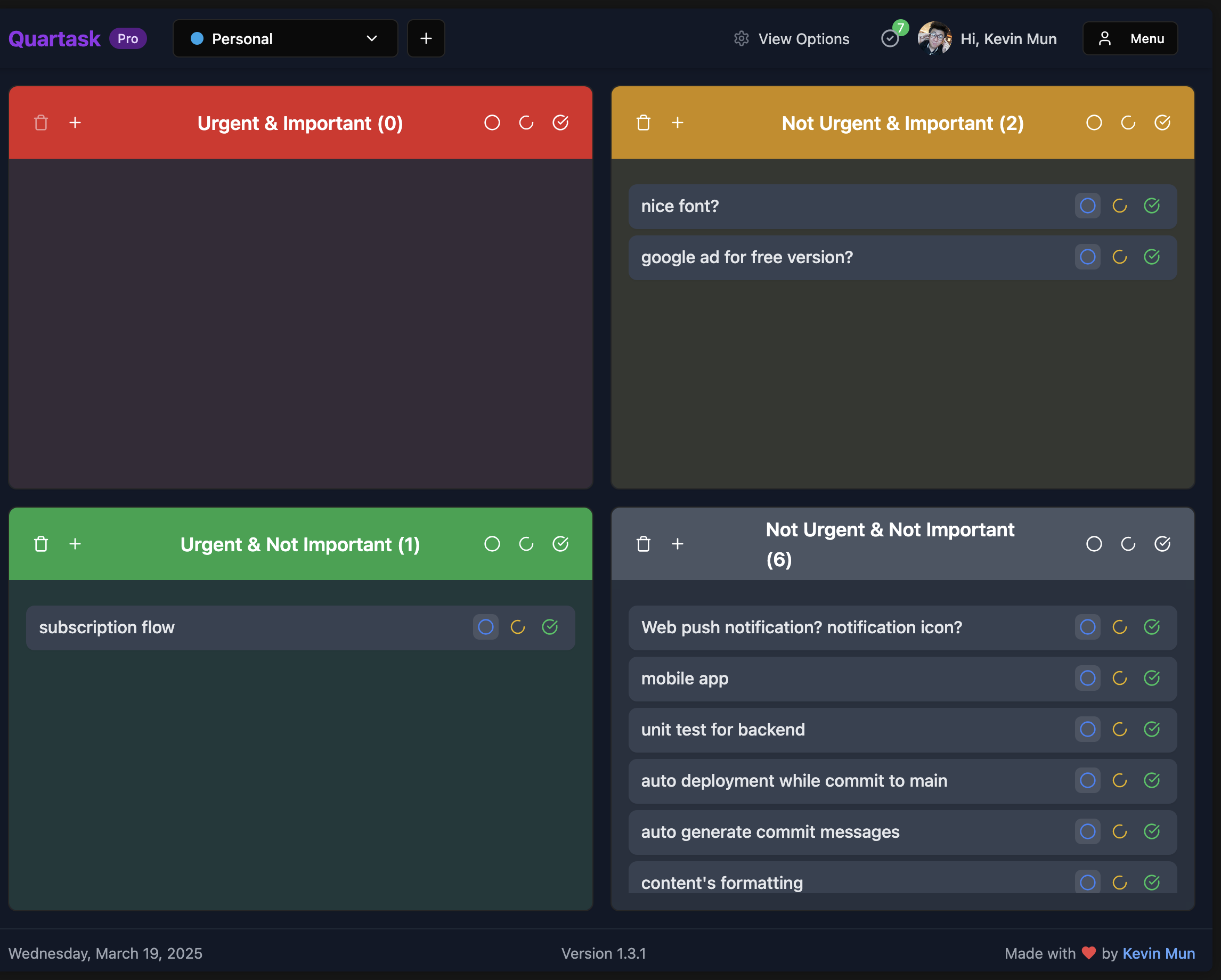
The visual 2×2 matrix makes it impossible to ignore your Q2 (important but not urgent) tasks.
Want to learn more about task prioritization?
100% Free. No Catch.
Every feature is free forever. Supported by non-intrusive ads — no paywalls, no subscriptions, no credit card.
2,500+ users trust Quartask for task prioritization
- ✓ Unlimited tasks & boards
- ✓ Smart reminders & sticky notes
- ✓ Markdown & drag & drop
- ✓ 7 languages & dark mode
- ✓ Anonymous access — no signup
- ✓ Achievement calendar
No credit card required. Start in 30 seconds.
Frequently Asked Questions
Everything you need to know about the Eisenhower Matrix and using Quartask for task prioritization.
What is the Eisenhower Matrix?
The Eisenhower Matrix is a productivity tool that categorizes tasks by urgency and importance into 4 quadrants: Do First (Urgent & Important), Schedule (Not Urgent but Important), Delegate (Urgent but Not Important), and Eliminate (Not Urgent & Not Important). It helps you focus on what truly matters instead of just what's loudest.
Is Quartask really free?
Yes! Quartask is completely free. You get unlimited tasks, unlimited boards, sticky notes, smart reminders, and all features — forever. No credit card required, no paywalls, no hidden costs. We're supported by non-intrusive ads.
How do I use the Priority Matrix for task management?
Using the Priority Matrix is simple: 1) List all your tasks, 2) Ask 'Is this urgent?' and 'Is this important?' for each task, 3) Drag tasks to the appropriate quadrant in Quartask, 4) Apply the action rules - Do Q1 tasks immediately, Schedule Q2 tasks, Delegate Q3 tasks, Eliminate Q4 tasks.
Do I need to sign up to use Quartask?
No signup required! You can start using Quartask immediately as an anonymous user. Your data is stored locally and you get full access to all features. If you want to save your data permanently or access it from other devices, you can link your anonymous account to Google at any time.
What's the difference between urgent and important tasks?
Urgent tasks demand immediate attention and have deadlines (emails, meetings, crises). Important tasks contribute to your long-term goals and values but don't have immediate deadlines (strategic planning, skill development, relationship building). The Eisenhower Matrix helps you prioritize important work over merely urgent work.
How does Quartask compare to Trello or Todoist?
Unlike Trello (general kanban) or Todoist (simple lists), Quartask is purpose-built for the Eisenhower Matrix method. We provide a native 2×2 quadrant view, smart reminders, and task prioritization features specifically designed for this productivity framework. Plus, we offer anonymous access and no feature limitations on the free plan.
Still have questions?
Contact us - we're here to help!Ready to Master Task Prioritization?
Join 2,500+ professionals who use the Eisenhower Matrix method to focus on what truly matters. No signup required.
✓ No credit card required • ✓ Anonymous access • ✓ All features free